
Developers are working smarter with AI: 84% currently incorporate or plan to incorporate AI into their development workflow according to this year’s Stack Overflow Developer Survey. We found that developers that were partially using AI in their workflow were mostly using it for writing code (59%), searching for answers (56%), learning new concepts (47%), or debugging code (47%).
With the promise of productivity gains and our community nodding to frustrations when AI gives not-quite-right solutions, we wondered where developers waste time or get frustrated with or without AI. Potentially the problem is not with the AI tools themselves, but rather that tasks which rely on good documentation have become more time consuming and frustrating. We conducted a survey this past October to find out from more than 800 developers what their role is, what tasks they are spending time on at work and what could be the source of their problems.
What’s all in a day’s work for developers?
| Response | Time intensity | Frustration | Frequency |
|---|---|---|---|
| Design schemas, pipelines or other architecture in an engineering capacity | 44 | 43 | 45% |
| Handle payroll, accounts payable, budgeting and/or financial planning | 67 | 64 | 11% |
| Maintain system reliability and performance for your company or as a service to others | 50 | 48 | 43% |
| Manage, hire and/or make decisions for people and/or teams | 42 | 47 | 23% |
| Support/manage business and/or operational tasks: not managing people, but supporting the tools and processes that help individual contributors do their jobs to the best of their abilities | 48 | 43 | 31% |
| Understand business problems in order to recommend solutions, technical or non-technical, external to your company | 49 | 47 | 36% |
| Work with code for open source software (source code is available to anyone to inspect, modify, copy, and learn from) | 53 | 47 | 32% |
| Work with code for proprietary software (you, the developer, do not own intellectual property rights to the code) | 67 | 44 | 66% |
| Work with predictive and/or machine learning technology in any capacity | 51 | 50 | 26% |
For the functions you selected, how much time do you spend doing these functions relative to all functions in your role AND how frustrating are these functions on a regular basis relative to all functions in your role? Select a rating from the scale where '0' is for functions with the least time spent/problematic and '100' is for those with the most time spent/problematic.
Most developers are in roles that deal directly with proprietary code (66%), followed closely by designing architecture and/or pipelines (45%), and maintaining systems performance for their employer (43%). These job functions define the core responsibilities of a modern developer. Getting a time-rating for the top-level job function helps establish a baseline for tasks we asked developers to rate and indicate frequency for in the survey data, as well. Proprietary code is where the most time is spent: on a 100-point scale, the average is 67, only matched by functions related to financial matters (budgeting, payroll, accounts payable). Less time is spent on maintaining systems performance (49) or architecture (44), and more time is spent on some of the less applicable functions developers report being core to their role such as working with open source code (54), working with predictive and/or machine learning technology (51) or understanding business problems (49).
Developers are not frustrated with their roles, relatively speaking. On a 100-point scale, roles working with proprietary code are rated 45 and designing architecture is rated 43 on average. An increase in frustration is noted with roles requiring more responsibility: the average rating for frustrations related to roles in charge of understanding business problems is rated 47, systems performance is rated 48, and predictive and/or machine learning technology is rated 50. Budgeting and payroll remain as frustrating as it is time-consuming, ranked 65 on average for being problematic.
What does this mean for developers that are adopting emerging technologies such as agentic AI or genAI at work? At least 47% of developers are using AI tools daily according to our latest developer survey; respondents in this pulse survey showed a slight increase to 50%. Daily AI tool usage is almost equal among developers in roles that work with proprietary code (50%), SRE roles(49%) or engineering architect roles (54%), confirming that these tools are increasingly adapting to different developer roles.
Time spent coding is more than just code
Tasks related to coding job functions show more nuance in the types of code and engineering work developers spend time doing. Writing code for new features and for existing software or architecture is where developers spend most time. Variable amounts of time are spent on CI/CD pipelines, working on business use cases, and learning code bases. The least amount of time is spent on deployments, documentation, catching up on messages and task management systems. When compared separately to survey data for AI usage, the tasks where developers spend more of their time are where AI usage also intersects. This year’s Developer Survey results show 59% developers who are currently partially using AI in their workflow do so for writing code and 47% for debugging or fixing code and 33% for learning about a code base.
Documenting code and deployments are in the bottom quartile for time spent on daily tasks and also rank high among tasks developers indicate they do not plan to use AI assistance within their workflow, deployments being the highest with 79%. Documenting code is a task that 39% of developers agree they do not plan to use AI assistance to complete, as well as 40% not planning to use AI for creating or maintaining other documentation. Documentation and deployments appear to either be not routine enough to warrant AI assistance or otherwise removed from existing workflows so that not much time is spent on it.
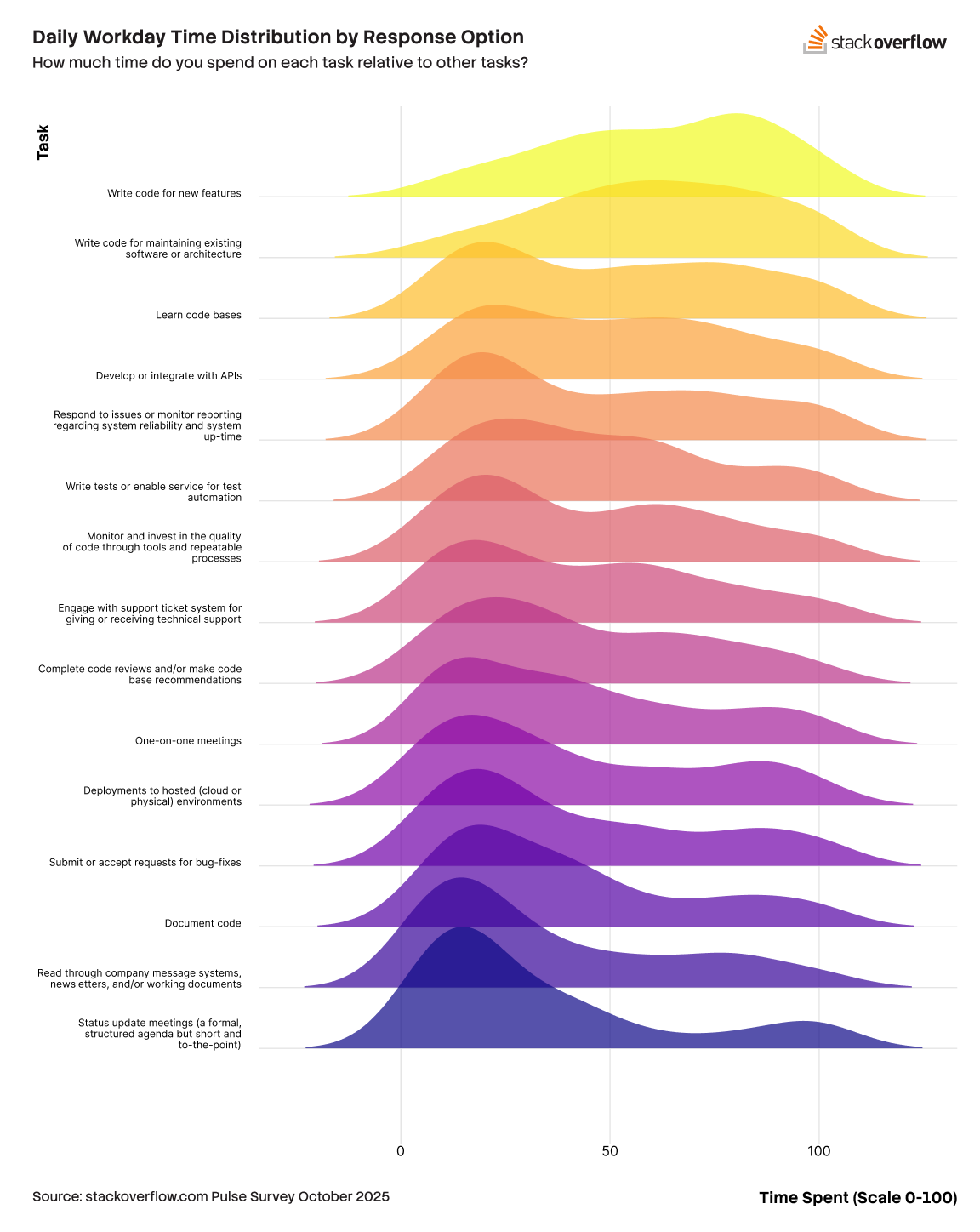
Documentation is something developers spend time doing, however these activities are infrequent and disjointed. Documenting code was selected as a daily task for 30% of developers responding to this survey and was indicated to be a weekly task for 40%, and no developers indicated documenting code with a monthly cadence. More typical documentation tasks occurring monthly are documenting project updates or creating presentations for team mates (35%) of developers, or work on reports or dashboards for monitoring systems (44%). Teams use ad hoc and one-off documentation solutions rather than a clean README file you might find in a code repository. Legacy knowledge can sometimes be found in Slack threads and enterprise ticketing metadata instead of neatly tagged and upvoted in Q&A posts on Stack Overflow. Documentation is the gift that keeps on giving when others need to understand how to use code or solve problems, but this inherent benefit of documentation is adding more time to a developer’s task load with or without AI assistance.
When there is no user guide to learn a code base
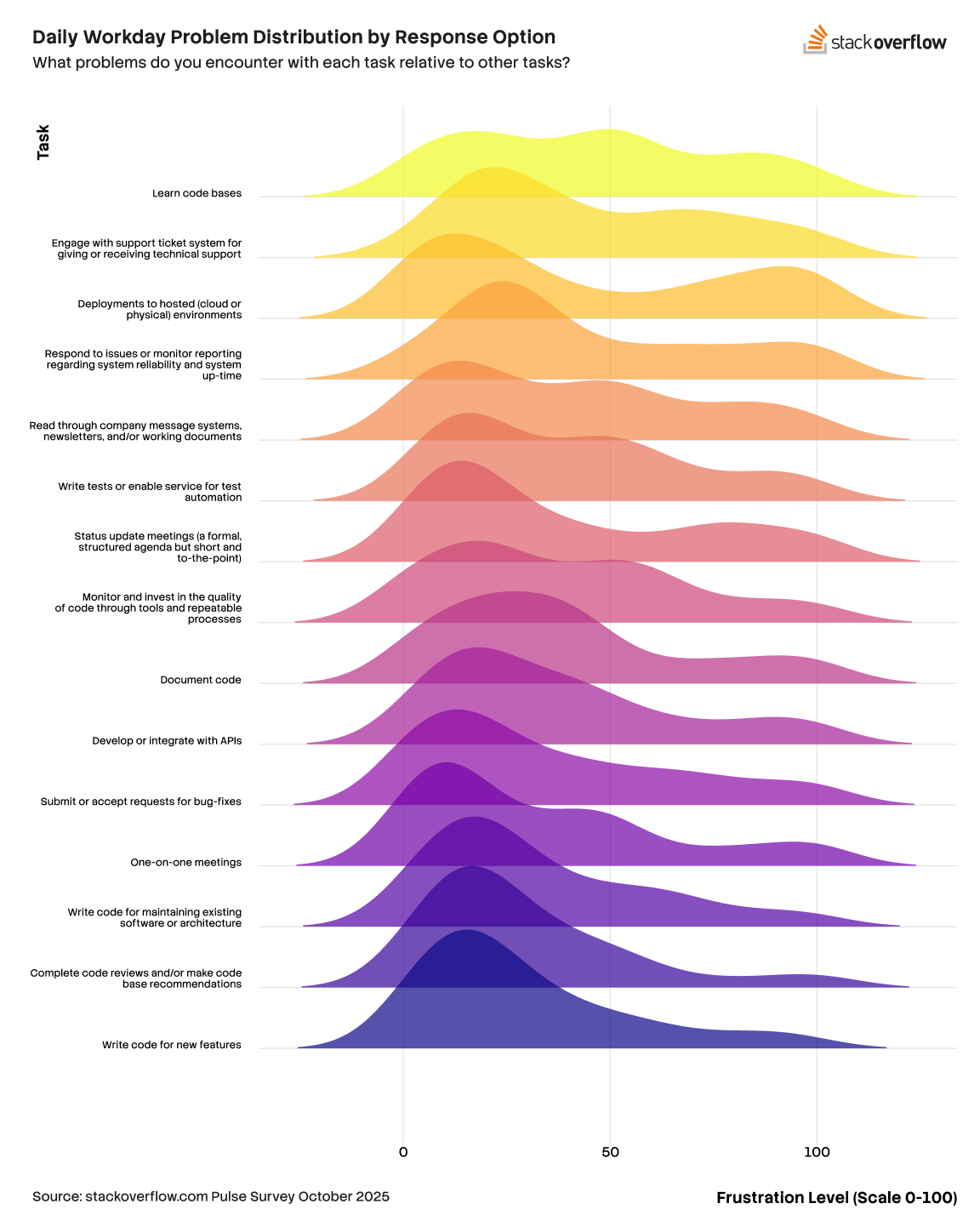
Frustrations for developers who primarily code reveal that coding is not the source of their problems, rather it is the disparate and uncoordinated documentation that few have ample time afforded to complete. Writing code for new features is the least frustrating, followed by code reviews, and writing code for existing software and architecture.
Creating documentation or presentations for teams or coworkers, deployments, and learning code bases are tasks that developers report higher levels of frustration day to day. Learning a code base is less time intensive and ranks higher in frustration for the average developer while writing code for new features is more time intensive but ranks the lowest in frustration. As noted above, almost twice as many developers are currently using AI at least partially for writing code than there are developers using it to learn code bases. While this may be explained by security concerns with AI agents accessing proprietary code, the below chart suggests that this could be due to the problematic nature of the task itself. Of the top frustrating tasks, Learning code bases requires more time than the other tasks that top the list for the share of frustration they impart on a developer's day. Deployments, support ticket systems, and reading through company errata rank lower in average time spent but all are associated with higher than average daily frustration. Central to all of these tasks is the lack of time spent on daily code documentation, which when done well can improve the execution of these tasks and lead to less frustration.
Experience plus time equals less problems
Monthly tasks for developers incur a lot less frustration than daily tasks. These tasks involve much less time by design, and even though time and frustration are not related, a logical conclusion might be that tasks outside of a developer’s daily focus results in lower levels of frustration. Learning code bases, if performed monthly instead of daily, are reported as less problematic. Migrating to a new tool or starting a new workflow process among a team of developers become the top frustrating tasks. These tasks involve research and require “starting from scratch” which is different from the routine and less frustrating daily tasks that include writing code.
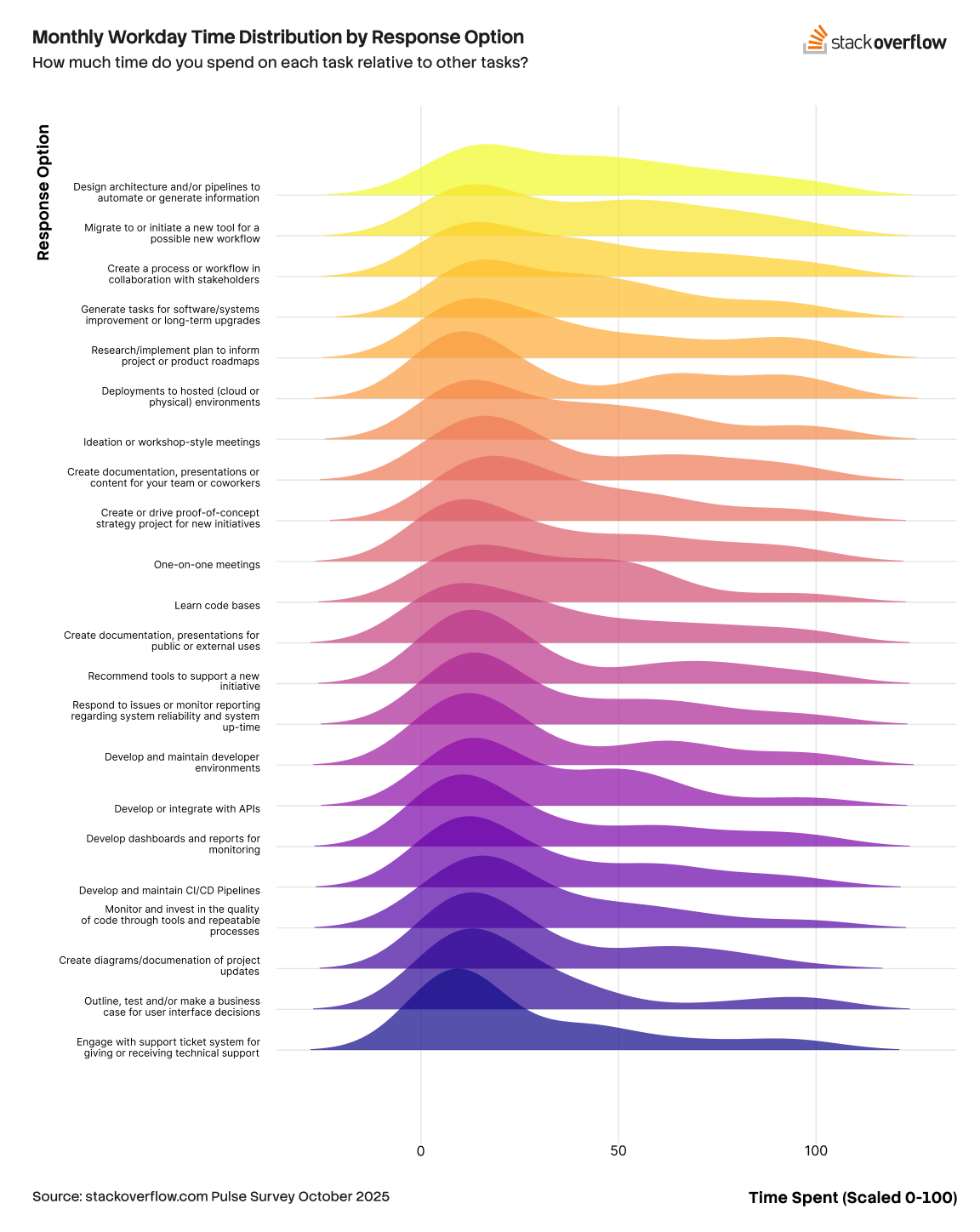
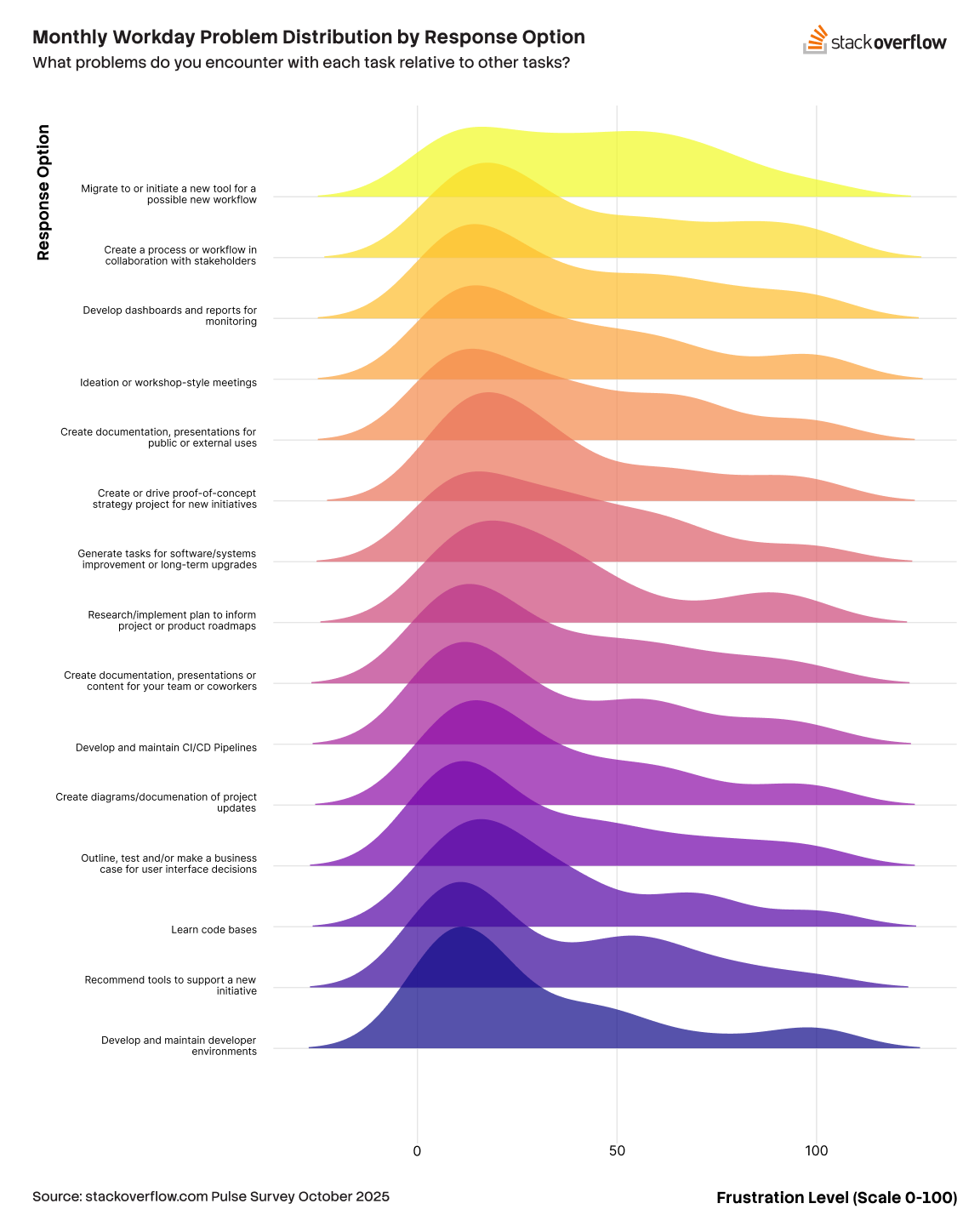
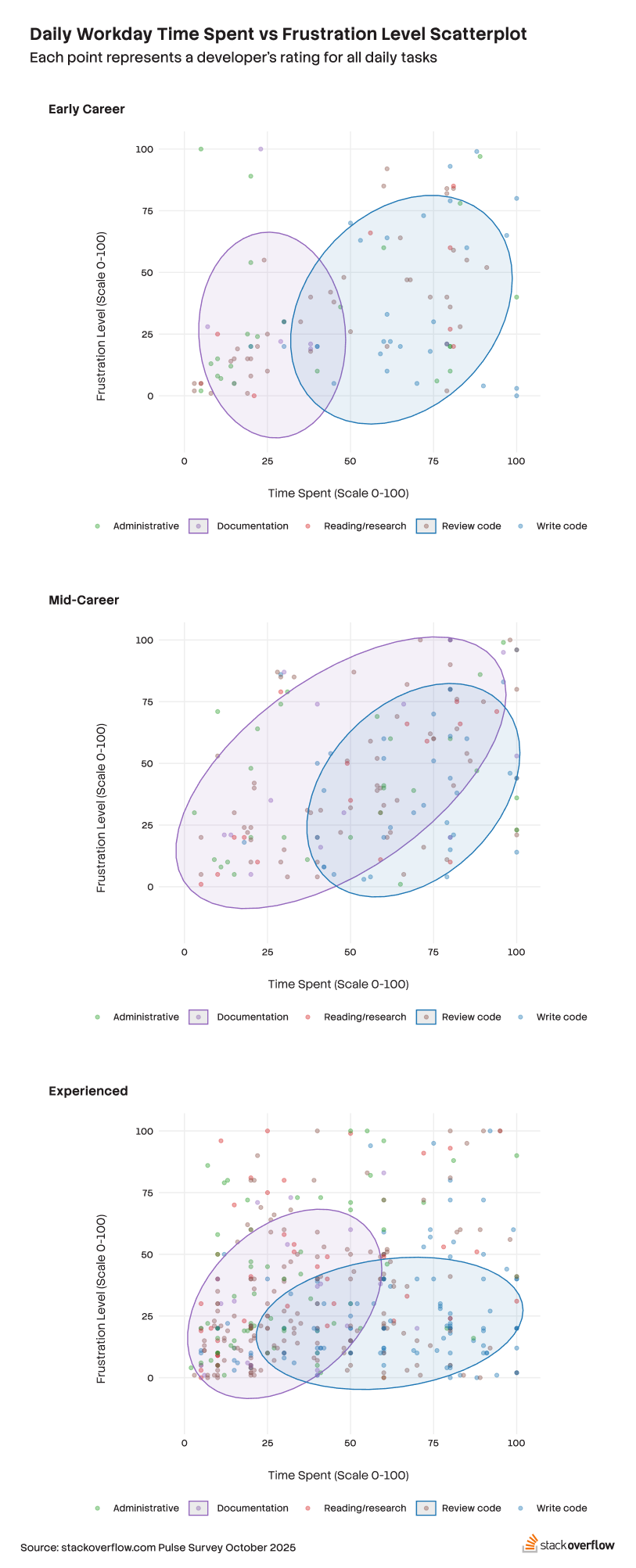
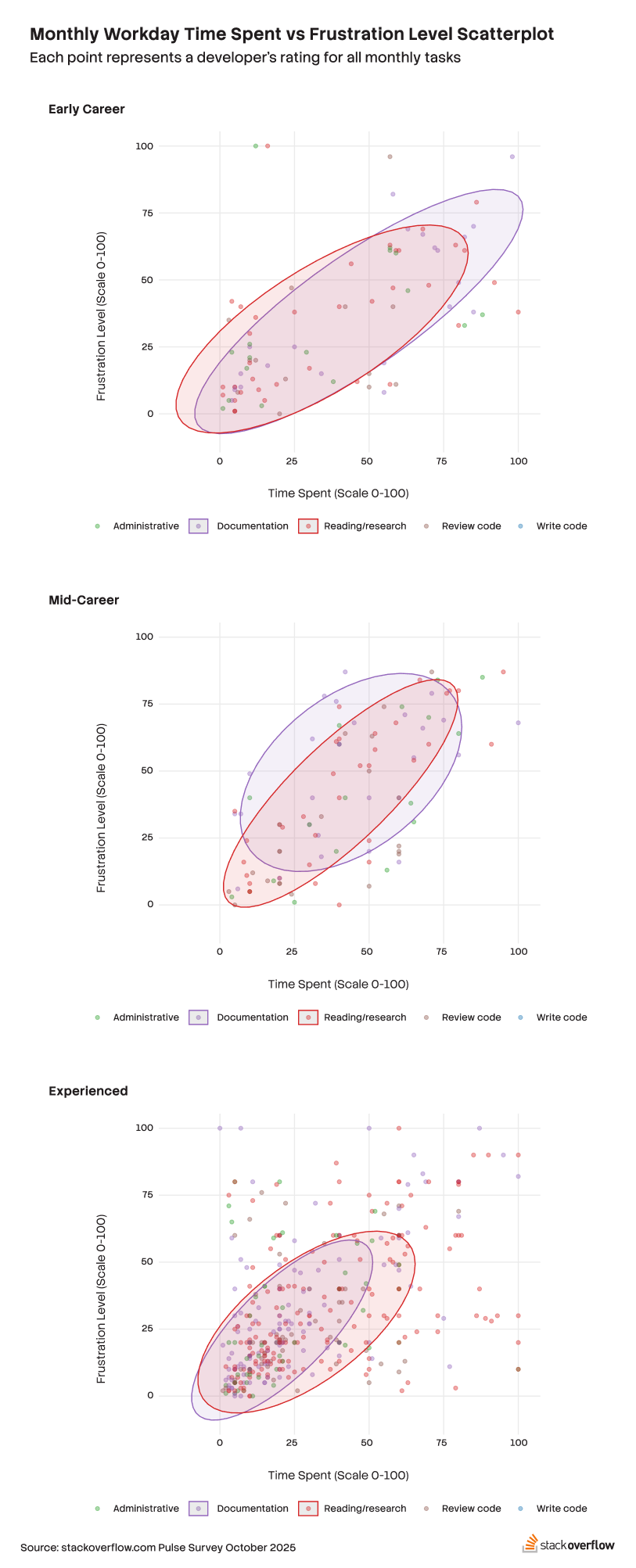
The data indicates that experience level plays a role in tasks that give developers outsized frustration compared to the time and frequency involved with those tasks. Given that tasks done on a more frequent basis could have additional efficiencies, we split up the survey data related to writing code and reviewing code for developers that indicate doing these tasks either daily or monthly to compare time and frustration trends with other task types of similar frequencies. Grouping together documentation tasks makes sense here for its low reporting time intensity, and research or cognitively intense tasks are grouped together for their prevalence in monthly frequency. We then segment the data into experience categories showing early-career as those with less than 5 years coding experience, mid-career as those with 5 - 10 years of experience and experienced developers with 10+ years of experience.
Daily documentation is not something developers at any experience level spend much time on. Monthly tasks, which have more research, comprehension, or documentation involved, show all groups spending less time on these but also finding more frustrations. Feature work, bugs and deadlines typically will take daily priority over documentation, but this can be exacerbated if deferred even at the monthly level. Documentation in monthly tasks appears to have a slightly stronger relationship between time spent and frustration, and is related to presentations and project updates which could depend on more research and reading tasks. Both task types show overlapping clusters in the monthly task data, pointing to similarities or comingling of the tasks themselves so that what similar characteristics these tasks have with each other may also be driving the relationship. Experienced and early-career developers spend less time on daily documentation than mid-career developers, yet mid-career developers show equal levels of frustration with writing code daily. Experienced developers spend the majority of their time writing code daily with low levels of frustration whereas those with less experience spend similar amounts of time coding but with higher frustration levels. Newer developers most likely need formal and easy-to-follow documentation more than experienced developers, making it more frustrating to write code when it is not well documented.
Code can be fleeting, documentation is forever
The latest survey results about developer work shows that time spent writing code is not the source of problems for developers. However, the relationship between the lack of time spent on documentation shows that tasks such as learning a code base or interacting with support ticket systems are likely made more frustrating due to the small amount of time spent on documentation by early career and experienced developers. Many developers are using AI assistance daily, and frustrations persist not necessarily because of AI failures but rather due to lack of foundational and reliable knowledge captured in documentation.