
Model Context Protocol (MCP), released in late 2024, is an emerging standard for communication between AI agents and services used to complete tasks.
By using MCP, you can expose functionality to a variety of agents, from desktop clients to autonomous LLM-based agents running on other systems. After configuration, agents take the prompts and determine which MCP servers and MCP features to use to accomplish the goal of the prompt.
Yeah, I find it a bit spooky too.
An MCP server is similar to a REST API: it offers standardized remote access to resources, data, and functionality.
In this article, you’ll learn about how to protect MCP servers from unauthorized access and how authentication of MCP clients to MCP servers works. Both users of MCP servers and those who build them will benefit from a deeper understanding of this authentication layer.
This article assumes you are familiar with the basics of MCP, otherwise you might want to review the MCP specification or this introductory article.
There have been a few versions of MCP, but the three that relevant to authorization are:
- The 2025-03-26 version
- The 2025-06-18 version
- The 2025-11-25 version
- The version under development, of which you can view a draft.
If you are building MCP servers, make sure you understand which version your clients support since that affects the capabilities you can offer. This article focuses on the 2025-11-25 specification, with occasional information about the more widely implemented 2025-06-18 version.
If you are reading this more than a few months into 2026, check the latest version of the specification and ensure you understand any changes.
Authentication and authorization’s current status
What is the current status of authentication and authorization in MCP? These occur at the transport layer. There are currently two supported transport technologies:
stdio- Streamable HTTP
Let’s take a look at each of these, and how authentication happens.
Standard Input/Output (stdio)
This transport runs the MCP server as a local process. These are also called “local” MCP servers. All communication takes place over standard input and standard output.
When you pipe a request to curl, you are usually implicitly authenticated. Similarly, with the stdio transport, no authentication between the MCP client and MCP server is required. The MCP server is started as a subprocess of the MCP client.
Environment variables configure the MCP server. For example, you can set an environment variable with the value of an endpoint URL to the server. The server then can use that environment variable at startup to connect to the correct service endpoint. Environment variables are perfect for configuration during the MCP server boot up process. While data can be passed, no explicit authentication takes place between the MCP client and the MCP server.
You can manage the authorization process of services behind the MCP server by providing environment variables. If the MCP server supports it, you can add an API key environment variable. The MCP server can use this variable to connect to backend services, which can limit functionality and data based on the API key. The specifics of this authorization process vary by MCP server.
Just like a curl request can be authenticated using basic auth, an API key, or an OAuth token, the request between the MCP server and the APIs or services it relies upon can be authenticated in the same way.
The exact mechanism for authentication and authorization for requests made by an MCP server is outside the scope of the MCP specification. But you darn well need one. We’ll talk more about this issue below.
We won't discuss the stdio transport again, since most of the authentication complexity occurs when you have a remote MCP server using the streamable HTTP transport. Let’s take a look at that transport next.
Streamable HTTP
This transport, introduced in the 2025-06-18 specification, uses the OAuth 2.1 protocol and other standards-based solutions to authenticate and authorize MCP clients. MCP servers that use this transport are called remote MCP servers, whether the MCP server lives on localhost, a private URL or a public URL.
However, you can have a remote MCP server that requires no authentication or authorization. An example of this is the context7 MCP servers. These are remote MCP servers, but because they surface documentation and are read-only, they don’t require any verification of the MCP client. Such MCP servers are in the minority, though.
Most MCP servers allow MCP clients to take action, and therefore need to know who the MCP client is and what it can do.
For such MCP servers, you use an OAuth flow. To use the OAuth terms:
- the MCP client is an OAuth 2.1 client
- the MCP server is an OAuth 2.1 resource server
- there is an authorization server
The authorization server is responsible for authenticating the MCP client, getting end user consent for the actions it is going to take, and issuing a token to the client. The client then presents the token to the MCP server, which validates it to ensure the client is authenticated and authorized. Per the MCP specification, the authorization process is an optional recommendation, but remote servers are strongly recommended to implement it.
We’ll dig into this OAuth process a lot more below.
SSE
For completeness, SSE is another transport which supports remote servers. It was deprecated in the 2025-06-18 specification and should not be used. It was replaced by Streamable HTTP.
Authentication and authorization from the MCP server downstream
As mentioned above, no matter what kind of communication protocol you are using to communicate from the MCP client to the MCP server, the question of authentication and authorization from the MCP server remains.
Because this logic is organization specific, it is difficult to give general guidance. An MCP server that is accessing a database will have different authentication and authorization logic than one that is accessing a REST API.
Plan to leverage whatever authentication and authorization solution that protected the data, functionality, or service before you created an MCP server.
However, it is important to avoid treating the MCP server as a monolithic entity. The MCP server is acting on behalf of the MCP client, and that information should be part of any authorization or authentication decisions.
An MCP server fielding a request from an MCP client that an admin user is using should have different capabilities than one from a non-admin user, for example, and that information needs to filter down to the requests the MCP server is making.
How to implement this depends on the authentication and authorization schemes you implement. When using the Streamable HTTP transport, Token Exchange is a good standards-based choice if the resources behind the MCP server expect OAuth tokens.
In this case, the MCP server provides the token used to authenticate the MCP client to an authorization server along with information about the downstream resource. The authorization server then can mint a new token which includes information about:
- The resource
- The MCP client
- The MCP server
This token can be provided to the downstream resource which can validate it and allow data access based on all the attributes.
There are other solutions out there for ensuring the requests the MCP server makes on the MCP client's behalf are correct, but definitely choose one. If you choose a different approach, the MCP specification prohibits passing through tokens.
How MCP authentication works
As mentioned above, with remote servers, MCP authentication uses the OAuth 2.1 Authorization Code grant and several related standards. Any further references to an MCP server in this post refer to remote MCP servers.
The flow starts with an unauthenticated MCP client such as Cursor or Claude Code. It ends with the MCP client having possession of an OAuth access token and presenting the token to the MCP server to gain access to data and functionality provided by it.
Here's a diagram of the flow:
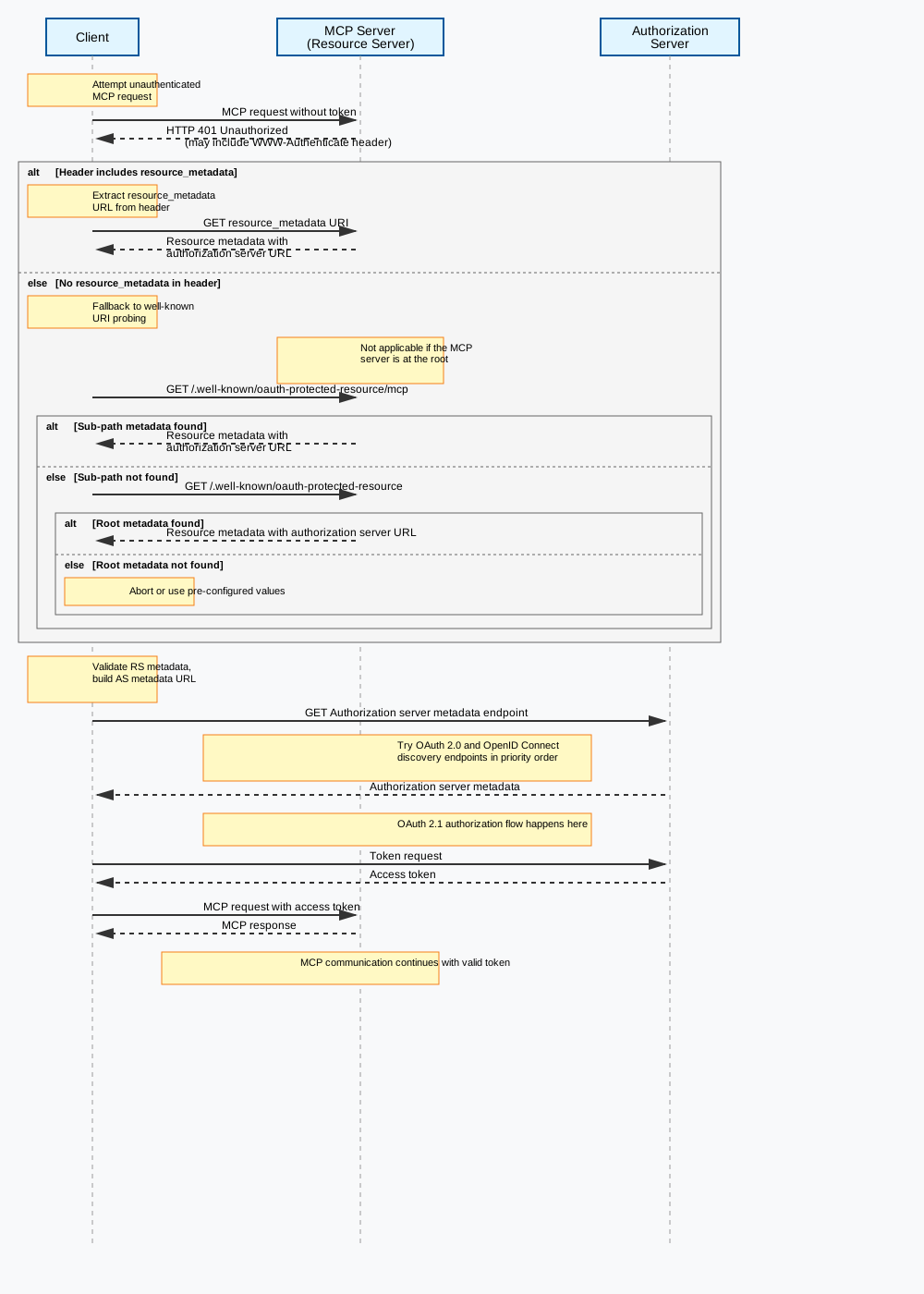
Confusingly, the term “client” can refer both to the MCP client and an OAuth client, but in the rest of this doc, I’ll be referring to the OAuth client unless otherwise specified. Let's walk through each of these steps in this diagram in more detail.
Initial handshake and protected resource metadata discovery
In step 1, an unauthenticated MCP client attempts to connect to an MCP server. The MCP server doesn't accept this request, and returns a 401 pointing to metadata. This metadata is defined by RFC 9728 and contains a list of at least one authorization server that can be used to authenticate the MCP client.
Here's an example response to the unauthenticated request:
HTTP/1.1 401 Unauthorized

WWW-Authenticate: Bearer resource_metadata="https://resource.example.com/.well-known/oauth-protected-resource"
The https://resource.example.com/.well-known/oauth-protected-resource URL is hosted at the MCP server. The values in it basically tell the MCP client “these are the authorization servers I trust”.
Here's an example of the response:
  {
   "resource":
     "https://resource.example.com",
   "authorization_servers":
     ["https://as1.example.com",
      "https://as2.example.net"],
   "bearer_methods_supported":
     ["header", "body"],
   "scopes_supported":
     ["profile", "email", "phone"],
   "resource_documentation":
     "https://resource.example.com/resource_documentation.html"
  }
As an implementation detail, the MCP client can choose any one of these authorization servers. Above, there are two possible authorization servers that can be used to gain access to this MCP server. However, having multiple authorization servers is pretty rare at present and is usually only used for resiliency by having multiple DNS aliases.
Authorization server discovery
The MCP client then retrieves metadata from the authorization server, as specified by RFC 8414 or OIDC Discovery. This metadata contains how the MCP client can communicate with the authorization server. This includes:
- methods to register a client (dynamic client registration or client ID metadata), where an MCP client can register with the authorization server
- the authorization endpoint, where a user can log in
- the token endpoint, which can be used to obtain a token to present to the MCP server
- any other authorization server specific metadata
Here's an example of authorization server metadata.
{
      "issuer": "https://server.example.com",
      "authorization_endpoint": "https://server.example.com/authorize",
      "token_endpoint": "https://server.example.com/token",
      "token_endpoint_auth_methods_supported": ["client_secret_basic", "private_key_jwt"],
      "token_endpoint_auth_signing_alg_values_supported": ["RS256", "ES256"],
      "userinfo_endpoint": "https://server.example.com/userinfo",
      "jwks_uri": "https://server.example.com/jwks.json",
      "registration_endpoint": "https://server.example.com/register",
      "scopes_supported": ["mcp:read", "mcp:write", "mcp:delete"],
      "response_types_supported": ["code", "code token"],
      "service_documentation": "http://server.example.com/service_documentation.html",
      "ui_locales_supported": ["en-US", "en-GB", "en-CA", "fr-FR", "fr-CA"]
}
Client registration
Now that the MCP client knows the authorization server trusted by the MCP server, the client may need to register itself with the authorization server. There are four options. In preferred order, they are:
- The client can register out of band if it has an existing relationship with the authorization server.
- The client can register using client ID metadata documents (CIMD). CIMD is an IETF document currently being discussed by the OAuth working group.
- The client can register with dynamic client registration (DCR).
- The user can be prompted to enter client information.
Dynamic client registration was, until the 2025-11-25 specification, the primary way to register clients. Let’s see what that looks like.
It does so using the registration_endpoint and functionality defined under RFC 7591. The MCP client provides information about itself and the desired redirect URI.
Here's an example client registration request:
{
      "redirect_uris": [
        "https://client.example.com/callback", "https://client.example.com/callback2"],
      "grant_types": ["authorization_code", "refresh_token"],
      "client_name": "My MCP client",
      "token_endpoint_auth_method": "client_secret_basic",
      "scope": "mcp:read mcp:write"
     }
The MCP client must be prepared to handle the OAuth 2.1 authorization code, created during the Authorization Code grant. This code is delivered to the redirect URIs, which must be either https URLs or point to localhost.
The scopes requested are what this client might request from the user, not the actual scopes requested. That happens later.
A sample successful response:
{
      "client_id": "8d4c3387-b6a2-471b-865f-35238f62175a",
      "client_secret": "cf136dc3c1fc93f31185e5885805d",
      "client_id_issued_at": 2893256800,
      "client_secret_expires_at": 2893276800,
      "redirect_uris": [
        "https://client.example.org/callback",
        "https://client.example.org/callback2"],
      "grant_types": ["authorization_code", "refresh_token"],
      "client_name": "My MCP client",
      "token_endpoint_auth_method": "client_secret_basic",
      "scope": "mcp:read mcp:write"
     }
Dynamic client registration is not required by the latest specification. It has been left in mainly for backwards compatibility and will likely be replaced by client ID metadata registration as the latest specification is implemented.
Client ID metadata registration allows clients to provide a URL to the authorization server, which then retrieves the metadata from that URL. This is a simpler option, but is not as widely supported.
But if you know every MCP client that needs to talk to your MCP server, you don't need to implement it; just pre-register your clients. This might happen if you are in a controlled environment with a fixed audience of MCP clients.
What you want to avoid is multiple MCP clients sharing the same OAuth client ID. If this were true, it'd be impossible to distinguish between different MCP clients. Additionally, authentication and scopes could be cached leading to clients seeing each other's data.
At this point the authorization server knows about the MCP client. Huzzah!
User authorization
Now, the MCP client is starting the authorization code grant. This is outlined in excruciating detail in this blog post I wrote in 2022. That post outlines the OAuth 2.0 Authorization Code grant, which is very similar to the OAuth 2.1 Authorization Code grant required by the MCP specification.
The following differences, however, are required by either the OAuth 2.1 specification or the MCP specification:
- PKCE must be used with the S256 method and the authorization server must advertise that PKCE will be used
- the resource parameter must be provided, per RFC 8707, and must be the MCP server URL
- the user will be prompted for consent for the requested scopes
Here's an example of the authorization URL that begins the authorization code grant.
https://server.example.com/authorize?
  response_type=code
  &client_id=mcp-8d4c3387-b6a2-471b-865f-35238f62175a
  &redirect_uri=https://client.example.org/callback
  &scope=mcp:write mcp:read
  &state=random-state-string-xyz789
&code_challenge=YTFjNjI1OWYzMzA3MTI4ZDY2Njg5M2RkNmVjNDE5YmEyZGRhOGYyM2IzNjdmZWFhMTQ1ODg3NDcxY2Nl
  &code_challenge_method=S256
  &resource=https://mcp.example.com
Many MCP clients also use the refresh grant to enable for transparent refresh of expired access tokens. We’ll talk about this more below.
At the end of a successful authorization, the MCP client has an access token and possibly a refresh token.
Making authenticated requests
The MCP client now makes the same request it made initially, but with a valid access token. It must include the token in the Authorization field like so:
Authorization: Bearer <access-token>
When the server receives the access token, it must validate the access token. How exactly to do so depends on the authorization server and the resource server, so consult your authorization server’s documentation.
If the access token is a signed JSON web token, which is a common format, ensure the token:
- is properly signed by the authorization server
- is issued by an authorization server the MCP server expects
- is designated for the MCP server by checking the audience claim
- is not expired
- has any expected custom claims
If the access token can’t be validated, the MCP server should fail the request with a 401 status code.
Increasing scope
If the client requests an operation and the access token does not contain the required scopes for that operation, the MCP server should negotiate for an increase in scope.
This is called step-up authorization and is new in the 2025-11-25 specification.
In this process, the MCP server responds with a 403 and a header that contains error messages and the new list of required scopes. The MCP client can then repeat the authorization steps, including possible user consent requests and then try to make the previously blocked request.
Access controls and security features
Storing the token
Unless you are writing an MCP client, you shouldn’t care too much about storing the token, since doing so should be handled properly by that component.
The access token delivered to the MCP client should be stored securely, similarly to any other bearer token. As a reminder, a bearer token is similar to a car key; anyone who has it can use it to access resources, so it should be treated carefully.
Never send the token as a URL query parameter and never store it where it might be stolen. The best place to store an access token depends on what kind of software an MCP client is.
The access token should have a short lifetime to mitigate risk if it should be stolen, inadvertently revealed, or logged.
Refreshing the token
As mentioned above, MCP clients can request a refresh token in the initial authorization process, typically by providing a certain parameter in the initial authorization request. The MCP client should store the refresh token just as securely as the access token.
When the access token expires or is invalid, instead of sending the user through the entire authorization flow again, the MCP client can:
- present the refresh token to the authorization server
- accept and store the resulting access token
A refresh grant doesn’t have to take place only when an access token expires; the client can pre-emptively refresh the token.
The refresh grant can also decrease the scope of the access token, though client support for this may be spotty. For example, if an MCP client no longer needs the mcp:write scope, it could make a refresh request omitting that scope; the returned access token would then not have it.
Securing agent to agent or server to server communication
The OAuth 2.1 authentication flow discussed handles situations where an end user wants to grant access to data or functionality guarded by an MCP server. If I wanted to allow Claude desktop access to my Gmail email account, that kind of flow suffices.
But what about agents or other software constructs acting on their own behalf? Or even a script running in a cron job? Can they use MCP?
They can, but the behavior has changed over time. The client credentials grant was mentioned in the 2025-03-26 version of MCP, was removed and now is coming back. There is a draft extension discussing the client credentials grant. The core MCP specification is intentionally silent on server-to-server auth to allow for implementation simplicity.
Google’s robust agent to agent (A2A) protocol offers more focus on this aspect.
If you use the OAuth client credentials grant, you obtain an access token just as you can one obtained through a OAuth 2.1 Authorization Code grant. The token can then be presented directly to the MCP server and go through the same validation process.
MCP scopes
These tokens shouldn’t be used for any other purpose than to allow access to an MCP server. However, to minimize risk of token misuse, the authorization server should have a set of scopes used for the OAuth clients that correspond to MCP clients.
These should be different from any used for other purposes, such as a third-party API, but there is no requirement for this. In the examples above, you may have noticed that the scopes had the mcp: prefix on them.
Scope design is complex and business specific, but to sum it up briefly, you should:
- Consult developers and end users to validate functionality to expose; you can also leverage any work you’ve done around API scopes.
- Think about what users of your MCP server want to accomplish.
- Cordon off functionality with different levels of impact; reading data is generally less destructive than writing it, which is less destructive than deleting it.
- Group functionality together; you don't always want a single scope to correspond to a single action a user might want to take, especially if you have a large number of scopes.
- Document the scopes clearly.
- Start small but not too small; provide sufficient functionality without having “super” scopes like “admin”.
- Review security implications with your security team.
For the scope values themselves, you need to balance:
- end user comprehensibility
- short, clear names
- business needs
- appropriate granularity
- implementation simplicity
Unlike with APIs, where the software clients are difficult to upgrade, in MCP, the scopes are controlled by the resource server and provided in the initial WWW-Authenticate header. They are dynamically retrieved.
If you have existing APIs that your MCP server is using, you can re-use much of the design, though MCP scopes should be broader. Just make sure you create a separate set of strings, though.
Testing and debugging
When you are building your remote MCP server, you should use the MCP inspector, which can handle both the OAuth flows and the interaction with your MCP server.
If you run into OAuth trouble, you can test the functionality with any OAuth compatible client. Using a tool like Postman or curl ensures you have the basics correct and adhere to the specification.
Making requests against an MCP server with a valid access token also allows for a tight testing loop. You can also set up automated tests to make sure your MCP server’s authentication process remains unchanged as you evolve it.
Next test with a variety of MCP clients that you expect to be used with your server. There are subtle differences between each client.
Debugging MCP is complex, since there are a number of different components in a successful request. The MCP Inspector is the go-to here as well.
Limitations and future considerations
What are some of the current limits and future directions for MCP, especially with respect to authentication and authorization?
Authentication and authorization related gaps
As mentioned above, one piece of authorization not well defined is how the MCP server interacts with the services and APIs which fulfill the MCP client’s needs. There is a security section in the specification which offers some guidance around token passthrough, stating “MCP servers MUST NOT accept any tokens that were not explicitly issued for the MCP server”, but that’s about it. As mentioned above, this kind of authorization is super business-specific but requires your attention.
There is also complexity around the dynamic client registration. While there is an RFC detailing how to manage or delete dynamic clients, it is not widely supported. This means there is an open question about how to manage or remove the OAuth client configurations that have been added on behalf of the MCP clients.
As mentioned above, there is another draft specification, client ID metadata, which makes registering OAuth clients at the authorization server simpler. This makes the OAuth client registration process easier by tying client metadata to a URL rather than requiring the dynamic client registration process. It also eases the server-side burden, since the client exists only when the metadata retrieval succeeds.
There’s also been discussion on whether or not OAuth is the right solution for authorization of MCP clients. This was discussed in depth in this issue, but the issue was closed and won’t be implemented.
Sometimes scopes don’t give enough granularity for what the MCP client wants to ask of the MCP server. The community has discussed adding Rich Authorization Requests to the MCP protocol. This standard allows for more fine grained authorization requests.
There’s a proposal to allow for generic extensions, such as the client credentials extension mentioned above, of which some will be authentication or authorization related. This is still a proposal. Whenever you have extensions, you gain flexibility at the expense of complexity and interoperability, so we’ll see where this proposal goes.
There’s another interesting draft extension which allows the MCP client to get tokens without the OAuth redirect. This simplifies certain enterprise scenarios.
You can review the proposals targeted for future MCP specification releases as they are added. Since the 2025-11-25 specification was recently released, there are no active projects at that link at the time of writing.
How to get involved
There are a wide variety of organizations and individuals involved in this protocol, from the model vendors like Anthropic, to AI agent identity vendors like Prefactor, to representatives of more traditional identity providers like Okta and Stytch. There are a couple of ways to get involved in the authentication aspects of MCP:
- Reviewing and commenting on the github issues list is a good way to get more familiar with the specification and problem space
- There is an MCP Auth interest group that meets biweekly online
- There are multiple auth related channels in the MCP discord, which you can learn more about on the MCP community page
Conclusion
MCP is key to making AI solutions useful. Since it extends these programs’ reach to other software systems, it is critical that such access be secure. The two different transports have different threat models and security implications, but both allow for authentication and authorization.
Because MCP servers are hosted and therefore more accessible to other systems, they have different security needs. Leveraging OAuth and the lessons learned from over a decade of securing APIs and services help meet those needs.
If you are interested in securing your MCP server, first consider whether it needs to be local or remote. If the latter, ensure you are handling the critical flows, setting up your scopes correctly, and following the provided security guidance.
Think about joining the MCP community as they continue to push the protocol forward, whether by commenting on GitHub issues or joining the various groups.
Thank you to Simon Russell for review and feedback.